
A New York business entity search lets you look up any company or organization registered with the New York Department of State. Corporations, limited liability companies (LLCs), limited partnerships, limited liability partnerships (LLPs), and not-for-profit corporations all file with the Department’s Division of Corporations, State Records and Uniform Commercial Code, and every filing creates a public record.
Searching those records is free, and no account is required. The official search tool is the Corporation and Business Entity Database, offered through the Department of State’s free Public Inquiry application. A search runs by entity name or DOS ID, the results filter by entity type, and each record opens to show its status, filing dates, and contact details. The database is updated regularly. This page walks through each search field, explains what an entity record contains, and lists the entity types people can and cannot find in the database.
How to Search New York Business Entities
The Public Inquiry application is simple once each field is clear. Follow these six steps:
- Open the official search. Use the button above to open the Department of State’s Public Inquiry application. It is free, and no login is required.
- Choose a Search By option. Pick Entity Name to search by legal name, DOS ID for an exact identifier, Assumed Name for a trade name a company files under, or Assumed Name ID when that identifier is known.
- Set the Search Functionality. Choose Begins With to match names that start with the text, or Contains to match the text anywhere in a name. Contains is the wider option, and it helps when the exact wording is uncertain.
- Filter by entity type if needed. The Entity List narrows the search to specific entity types, such as LLCs or business corporations. Leaving every type selected works well for a broad entity search.
- Click Search the Database. The application returns a list of matching entities.
- Open the matching record. Check the DOS ID, entity type, county, and status to confirm the right entity before relying on the details.
Good to know: a DOS ID is the nine-digit identifier assigned when an entity files with the Department. When the ID is already known from a contract or a court paper, searching by DOS ID returns an exact match with no guesswork.
Search Fields Explained
Each field in the application controls one part of the query. Here is what each one does:
| Field | What it does |
|---|---|
| Search By | Chooses the record key: Entity Name, DOS ID, Assumed Name, or Assumed Name ID. |
| Search text box | Holds the name, ID, or trade name to match. |
| Search Functionality | Sets the matching rule: Begins With or Contains. |
| Entity List | Filters the results to selected entity types. |
| Search the Database | Runs the query and lists every matching entity. |
Two fields do the heavy lifting. Search By decides what kind of record the search reads, and Search Functionality decides how loosely the text matches.
Entity Types in the Database
The database holds records for every entity type that files with the Division of Corporations. The Entity List filter focuses a search on one type at a time.
Types With Records
- Domestic business corporations — formed under New York law
- Foreign business corporations — formed elsewhere and registered in New York
- Not-for-profit corporations
- Limited liability companies (LLCs)
- Limited partnerships
- Limited liability partnerships (LLPs)
The jurisdiction field separates domestic from foreign entities, since a foreign corporation keeps its home formation and registers in New York too.
Types Without Records
Knowing the gaps saves wasted searches. The database holds no records for the following forms:
- Sole proprietorships — they do not file with the Department of State.
- General partnerships — no state filing means no record.
- County-level trade names — sole proprietors and partnerships file assumed names with county clerks, not with the Department.
- Court cases, tax filings, and licenses — courts and other agencies keep those records.
Tip: a business that cannot be found may be a sole proprietorship or a general partnership. County clerks keep trade name filings for those forms, so a county search fills the gap the state database leaves.
A missing record does not mean a business does not exist. It often means the business took a form that never files with the state.
Entity Name Search vs. DOS ID Search
The two main search methods suit different jobs. A name search casts a wide net; a DOS ID search pins down a single record:
| Aspect | Entity Name search | DOS ID search |
|---|---|---|
| Best for | Finding entities when only a name is known | Confirming one exact entity |
| Match type | Partial text match, widened by Contains or narrowed by Begins With | Exact nine-digit number |
| Results | May list many similar entities | Returns a single record |
| Needed input | The distinctive part of the name | The full nine-digit ID |
The methods work best in pairs. A name search finds the candidates; the DOS ID in the results locks the choice for every later step.
Assumed Names in Entity Searches
Many companies operate under a name different from their legal one. Corporations and LLCs file assumed name certificates with the Department of State, and those filings appear in the database. Switching Search By to Assumed Name reads that side of the registry.
The match is not automatic. A trade name shows up in a legal-name search only when it forms part of the registered name. When a store advertises under a name its formation papers never mention, the Assumed Name option is the one that connects the two.
What the Entity Record Shows
Opening an entity from the results displays the information the Department maintains for that record.
Every Field on a Record
- Current entity name and prior names
- Nine-digit DOS ID number
- Entity type
- Date of organization or authorization
- Jurisdiction, if the entity was formed outside New York
- New York county
- Current status (active or inactive) and the status date
- Address to which the Department of State will mail process served on the Secretary of State
- Registered agent, if one is designated
- Filing history
For business corporations, the record shows the CEO’s name and address from the last biennial statement. The service-of-process address appears on many records; the Secretary of State heads the Department of State and acts as agent for service of process for many entities.
Prior Names on the Record
Prior names deserve a look during any identity check. A company that rebranded keeps its old name in the record, which explains why a familiar business now files under different words.
Status and Status Dates Explained
Every record carries a status: active or inactive, with the date the status took effect. Active means the entity is on file and current as of its latest paperwork. Inactive means the registry no longer lists the entity in good standing, and the status date plus the filing history give the context.
The date matters as much as the word. A status updated recently reflects fresh paperwork, and an old date signals a record the Department has not touched in a long time. For decisions with money attached, the New York Business Status Search page takes a closer look at this field.
Service of Process in Entity Records
The service-of-process address answers one question: where would the Department mail legal papers served on the Secretary of State for this entity? Entities keep the address current with the Division of Corporations, and the record shows whatever the entity filed last.
The field earns attention in any dispute. A party planning to serve papers on a company can confirm the official address first, and the New York Service of Process page explains the rules in detail.
Examples of Entity Searches
Three everyday jobs show how the pieces fit together.
Finding an LLC by Name
A person who needs to confirm a neighborhood bakery organized as an LLC would open the official search, pick Entity Name, and choose Contains. Typing the distinctive words of the shop name — without “LLC” — and leaving every entity type selected returns every close match. The correct record shows the expected county, an active status, and a formation date that matches the shop’s history.
Confirming a Corporation Is Active
A lender reviewing a loan application wants proof that the borrower’s corporation stands in good order. Searching the exact name with Begins With returns a short list, and the record behind the right DOS ID shows the status and status date. A recent date beside the word active supports the borrower’s story. When the lender needs paperwork instead of a screen, the Certificate of Status page explains the written request.
Checking a Foreign Corporation
A supplier asked to extend terms to a company formed in another state would check the jurisdiction field. A foreign corporation authorized in New York keeps its home formation and shows its home state or country in the record. The rest of the entry — DOS ID, county, status — reads like any domestic entity.
Mistakes in Entity Searches
Most failed searches trace back to a handful of habits:
- Typing the full styled name. Punctuation and designators such as “Inc.” add noise; distinctive words match better.
- Choosing Begins With too early. A record may carry a prefix such as “The,” and Contains catches those cases.
- Ignoring the status date. Active means little without the date beside it.
- Stopping at the summary. The record’s filing history and addresses settle identity questions.
- Assuming every business type is listed. Sole proprietorships and general partnerships never appear.
- Confusing similar entities. Two matching names in different counties are different organizations, and the DOS ID tells them apart.
Reading the Filing History
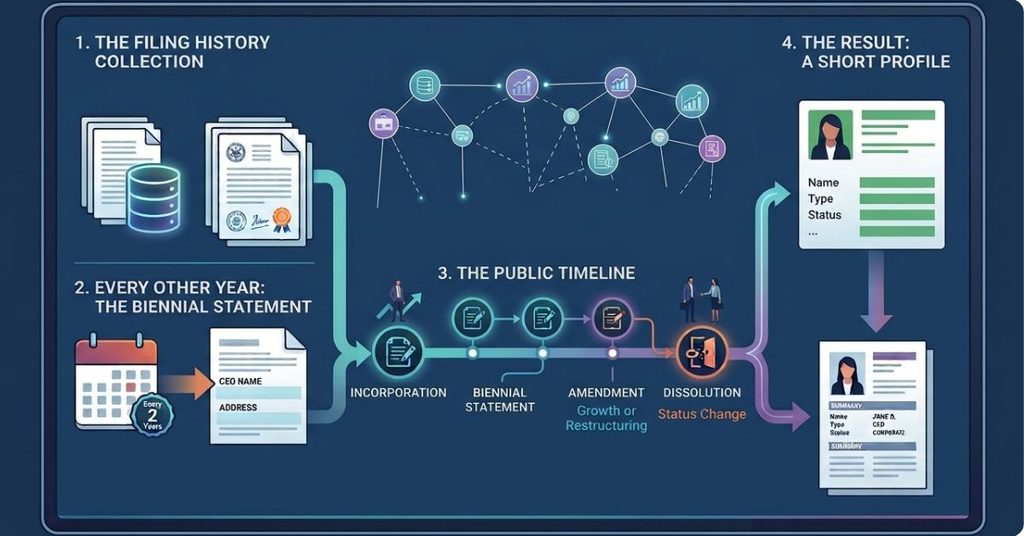
The filing history collects the paperwork an entity has filed with the Department. Business corporations add a biennial statement every other year, and the last one supplies the CEO name and address shown in the record.
The list reads like a company’s public timeline. A string of amendments often signals growth or restructuring, and a dissolution filing explains a sudden change in status. Paired with the summary fields, the history turns a single search into a short profile of the business.
How to Interpret Entity Search Results
A results list is a set of candidates, not an answer. Read it in this order:
- Read the entity type first. A corporation and an LLC with the same name are different organizations.
- Check status and status date together. The date shows whether the record is current.
- Match the county. Location often separates two similar names.
- Compare the formation date with the company’s own claims. A business founded years ago should not show a recent filing date.
- Confirm with the DOS ID. The nine-digit number ends any remaining doubt.
New York Notes for Entity Searches
A few state-specific points shape every entity search:
- The search is free and requires no account, and the database is updated regularly.
- The current search application is apps.dos.ny.gov/publicInquiry. Older pages sometimes link to a retired search address.
- Results are informational. For official proof of an entity’s standing, request a Certificate of Status in writing from the Division of Corporations.
- An LLC formed in New York must publish notice in two newspapers for six consecutive weeks within 120 days of formation.
- Business corporations file biennial statements every other year, and the last one supplies the CEO name shown in the record.
Why Entity Records Are Public
New York treats entity filings as public information. Anyone can confirm that a company exists, when it formed, and where legal papers get delivered. That openness protects the people who sign contracts, lend money, or hire the company, and a customer can check a status before paying a deposit.
Next Steps After an Entity Search
The record answers the first round of questions. When a situation needs more, these pages pick up where the search ends:
- New York Certificate of Status — official written proof of standing
- New York Business Documents — certified copies of filings
- New York Service of Process — where legal papers go
- New York Company Records — deeper detail on record fields
- New York Business Status Search — a focused look at active and inactive status
Related Searches
These pages cover the searches and records that connect to entity lookups:
- New York Business Name Search
- New York LLC Search
- New York Corporation Search
- New York Nonprofit Search
- New York DOS ID Search
- New York Business Status Search
- New York Name Availability
- New York DBA / Assumed Name Search
New York Department of State — Division of Corporations, State Records and UCC
- Address: One Commerce Plaza, 99 Washington Avenue, Albany, NY 12231-0001
- Phone: (518) 473-2492 (Monday–Friday, 8:45 AM – 4:30 PM ET)
- Email: corporations@dos.ny.gov
- Official website: dos.ny.gov
NewYorkCompanySearch.us is an independent website and is not affiliated with, endorsed by, or sponsored by the New York Department of State or any government agency. All searches are performed on official state databases linked from this page.
Frequently Asked Questions
These answers cover the points people raise most often about entity searches in New York. Each one reflects how the official database works.
Is the New York business entity search free?
Yes. The Corporation and Business Entity Database is free to use, no account is required, and the Department updates the database regularly.
What is a DOS ID?
A DOS ID is the nine-digit identifier the Department assigns when an entity files. It is the most precise way to search; two companies can share a similar name but never a DOS ID.
Can the search be filtered to one entity type?
Yes. The Entity List field filters the search to the selected entity types before the query runs. A filter set to LLCs hides every other type.
What is the difference between a domestic and a foreign entity?
A domestic entity formed under New York law. A foreign entity formed elsewhere and authorized to do business in New York. The jurisdiction field shows the difference.
Is an entity search the same as a name availability check?
The database search is the first availability check, and a fuller process exists for planned filings. Identical or deceptively similar names may cause a filing to be rejected. The New York Name Availability page walks through the complete check.